> ## Documentation Index
> Fetch the complete documentation index at: https://docs.restauric.com/llms.txt
> Use this file to discover all available pages before exploring further.

# Add Ingredient Category

> Create categories to organize ingredients for better inventory management.

This guide helps you create ingredient categories (e.g., Vegetables, Dairy, Spices).

> **Prerequisite**\
> Ensure you have access to inventory management.\
> Learn how to log in here: [Login Guide](/index)\
> Learn how to assign role and premission here: [**Assigning Roles & Permissions**](/assigning-user-role-permissions)**.**

## Add New Category

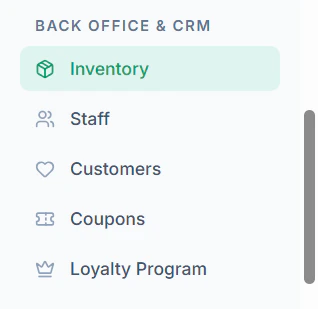
1. Navigate to **Inventory** menu in sidebar
   <Frame>
     <img src="https://mintcdn.com/axon-d19cba9f/yljNxcPT7d6Vg0Az/images/image-77.png?fit=max&auto=format&n=yljNxcPT7d6Vg0Az&q=85&s=2817bf4822777ad6b1ce822f9fe320c9" alt="Image" width="318" height="309" data-path="images/image-77.png" />
   </Frame>
2. Click **Manage Categories** on the top or click **+ Add Category**

   <Frame>
     <img src="https://mintcdn.com/axon-d19cba9f/yljNxcPT7d6Vg0Az/images/image-79.png?fit=max&auto=format&n=yljNxcPT7d6Vg0Az&q=85&s=6f4a590c112884ed39aee67bc57846fa" alt="Image" width="221" height="64" data-path="images/image-79.png" />
   </Frame>
   <Frame>
     <img src="https://mintcdn.com/axon-d19cba9f/yljNxcPT7d6Vg0Az/images/image-78.png?fit=max&auto=format&n=yljNxcPT7d6Vg0Az&q=85&s=34d3efbf099e825535135395dee1ebfd" alt="Image" width="479" height="76" data-path="images/image-78.png" />
   </Frame>
3. Click **+ Create New Category**
   <Frame>
     <img src="https://mintcdn.com/axon-d19cba9f/yljNxcPT7d6Vg0Az/images/image-80.png?fit=max&auto=format&n=yljNxcPT7d6Vg0Az&q=85&s=a210df998f2a3d0a62db4352aa58a074" alt="Image" width="457" height="75" data-path="images/image-80.png" />
   </Frame>
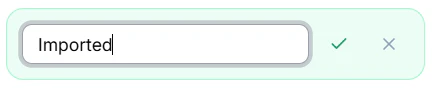
4. Enter **Category Name** and click **Tick Mark**
   <Frame>
     <img src="https://mintcdn.com/axon-d19cba9f/yljNxcPT7d6Vg0Az/images/image-81.png?fit=max&auto=format&n=yljNxcPT7d6Vg0Az&q=85&s=9f6097d705219365520de98b312a3233" alt="Image" width="436" height="99" data-path="images/image-81.png" />
   </Frame>

