> ## Documentation Index
> Fetch the complete documentation index at: https://docs.restauric.com/llms.txt
> Use this file to discover all available pages before exploring further.
# Assigning User Roles & Permissions
> Define staff roles and control access to different modules of the system for secure and efficient operations.
This guide explains how to assign roles and permissions to staff members, ensuring each user has the appropriate level of access.
> **Prerequisite**\
> Ensure staff members are already created in the system.\
> Learn how to add new staff here: [Staff Setup Guide](/staff-setup-guide)
## Update Role & Permissions for Existing Staff
1. Navigate to **Staff** in the left side submenu Below **BACK OFFICE & CRM**
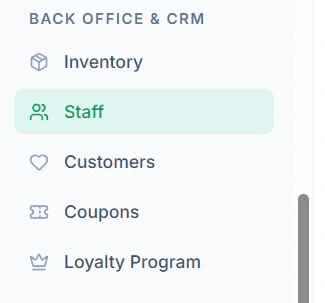 2. Click on **Edit Icon** to edit an existing staff profile
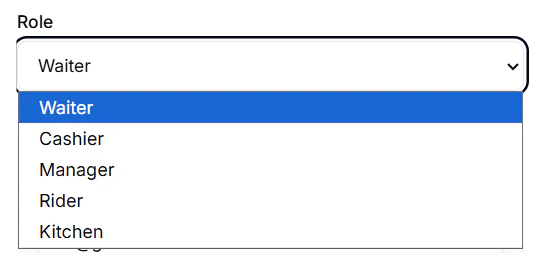
 3. Update the **Role** from the dropdown (e.g., Admin, Manager, Cashier)
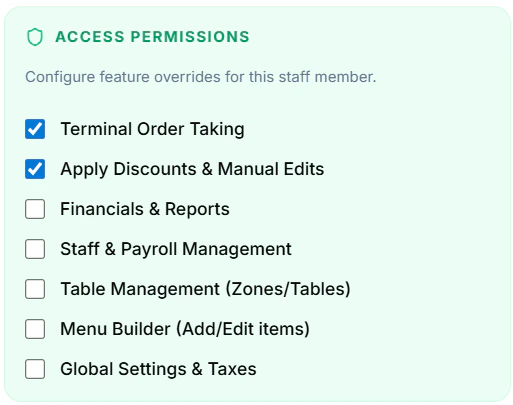
 4. Assign **Access Permissions** based on role
 5. Click **Save Profile**
## Understanding Permissions
Permissions control what actions a staff member can perform:
* **POS Access** – Create and manage orders
* **Orders Management** – View and update order status
* **Inventory** – Manage stock and items
* **Reports** – Access sales and performance reports
* **Staff Management** – Add/edit/remove staff
Assign permissions carefully to maintain security and smooth operations.
## Tips
* Use predefined roles for faster setup
* Grant only necessary permissions (principle of least access)
* Regularly review and update staff roles
5. Click **Save Profile**
## Understanding Permissions
Permissions control what actions a staff member can perform:
* **POS Access** – Create and manage orders
* **Orders Management** – View and update order status
* **Inventory** – Manage stock and items
* **Reports** – Access sales and performance reports
* **Staff Management** – Add/edit/remove staff
Assign permissions carefully to maintain security and smooth operations.
## Tips
* Use predefined roles for faster setup
* Grant only necessary permissions (principle of least access)
* Regularly review and update staff roles